
NOTE: This feature is available for Pro Plan users only. For more information on pricing plans, see Exclaimer Pricing Plans.
Description
The Tamper alerts feature lets administrators review signature policy violations detected by the Exclaimer Compliance Add-in across their organization's outgoing emails. Administrators can view a list of recorded violations and open an individual violation to see its details.
Pre-requisites
• Install Exclaimer Compliance Outlook Add-in
• Install Exclaimer Outlook Add-in
• Authorized tenant administrator
• Install Exclaimer Compliance Outlook Add-in
• Install Exclaimer Outlook Add-in
• Authorized tenant administrator
How to access it
To access Tamper alerts:
- From the menu sidebar, select Analytics.
- Select the Tamper alerts tab.
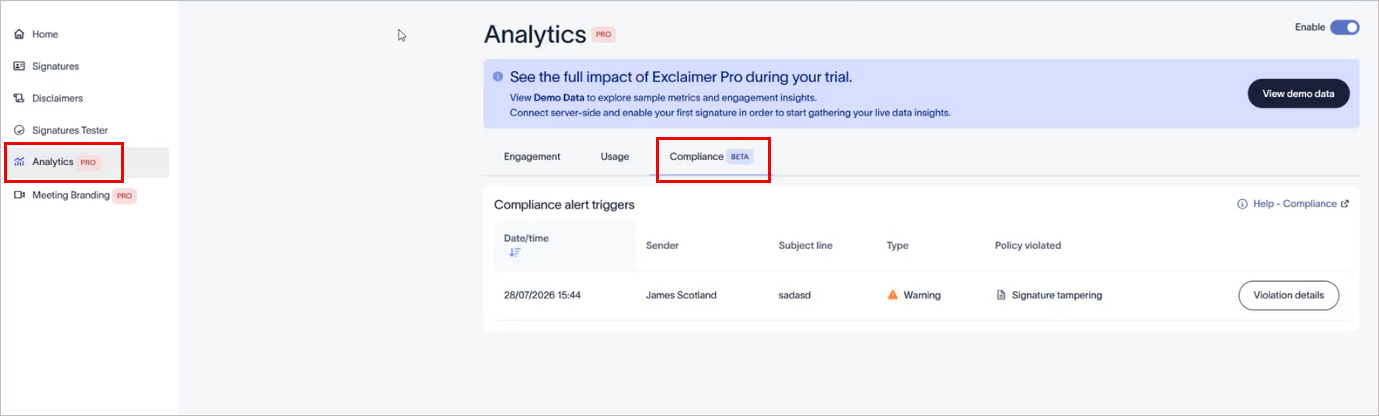
Select the Tamper alerts tab.
NOTE: Data is currently available for Microsoft 365 users who have both the Compliance Add-in and the Exclaimer Outlook Add-in installed.
Understanding the Tamper alerts
If no violations have been recorded, the dashboard displays an empty table.
The Tamper alerts list each recorded violation in a table with the following columns:
| Column | Description |
|---|---|
| Date/time | The date and time the violation occurred. |
| Sender | The name of the user who sent the email. |
| Subject line | The subject line of the email. |
| Action |
The action taken on the email when the violation was detected.
|
| User notified | Indicates whether the sender was notified of the violation (Yes or No). |
| Policy violated | The policy that was breached. |
Select Violation details to view more information about the selected violation. For more information, see Policy Violations.