
This feature will be available for Pro Plan users only. For more information on pricing plans, see Exclaimer Pricing Plans.
Description
The Exclaimer Compliance Add-in checks your Exclaimer-managed email signature when you select Send. If you have changed the signature text, the Add-in flags a policy violation.
The Compliance Add-in does not block or interrupt the email flow.
• Install Exclaimer Compliance Outlook Add-in
• Install Exclaimer Outlook Add-in
• The Compliance Add-in currently supports New Outlook and classic Outlook on Windows, and Outlook on the web. It is not currently supported on Outlook on Mac or Outlook on mobile devices (Android/iOS).
Using the Add-in
To use the Exclaimer Compliance Add-in:
- Compose your email as normal in Outlook.
-
If you change the text within your Exclaimer-managed signature and select Send, a message appears to let you know that Exclaimer Compliance is checking your signature. This message will appear each time you send an email while the Compliance Add-in is installed.
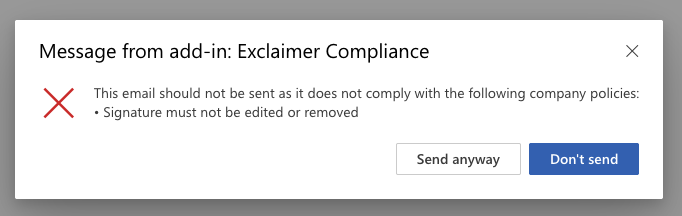
Message from the Exclaimer Compliance Add-in.
If you have not changed the text of your signature, no message is displayed, and the email is sent as normal.
If you have changed the signature text, you can select one of the following options:
• Send anyway: Send the email with the modified signature.
• Don't send: Stop the email from being sent so you can revert the signature and send it again. If you revert the changes, the message will no longer appear.