
Description
Once your Exclaimer trial is complete, you can select a subscription plan that fits your needs. Payment options include credit card, debit card, or, for larger organizations, purchase order with invoicing. Available methods may vary depending on your organization’s size.
Select an option below to view the related instructions:
To access the Purchase option:
If you have multiple subscriptions
- Log in to the Exclaimer portal and navigate to the Buy Now tab.
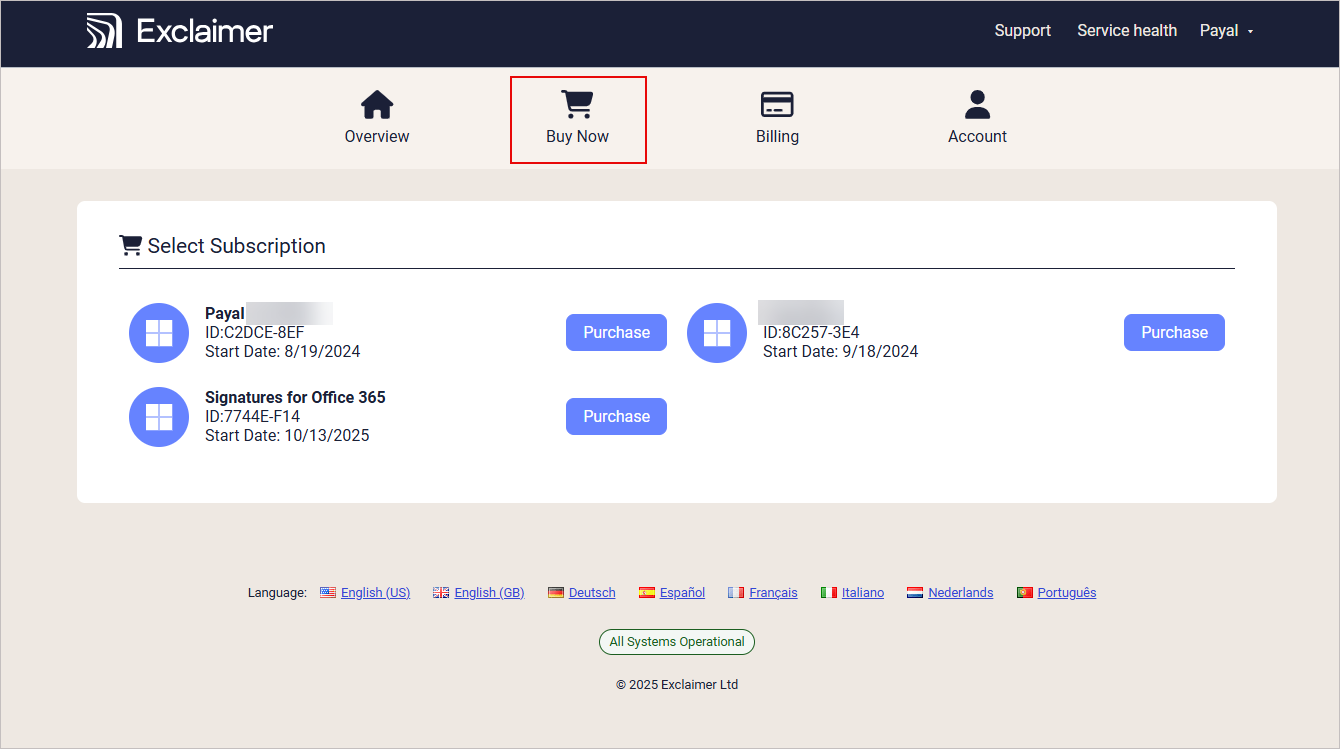
The Buy Now tab has a shopping cart icon.
All subscriptions available for purchase are displayed under Select Subscriptions.
- If you do not have any subscriptions available to purchase, create a new subscription.
- Select Purchase next to the relevant subscription. The Purchase screen is displayed.
If you have a single subscription
- Log in to your Exclaimer account using your subscription Owner credentials and launch your subscription.
- From the header bar, select the initials icon, then select Purchase. The Purchase screen is displayed.
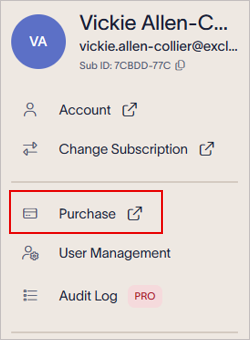
Select the initials icon to open the Account menu. The initials are of the user currently logged in.
To purchase a subscription:
In the Purchase screen,
-
Select the plan you wish to purchase: Starter, Standard or Pro.
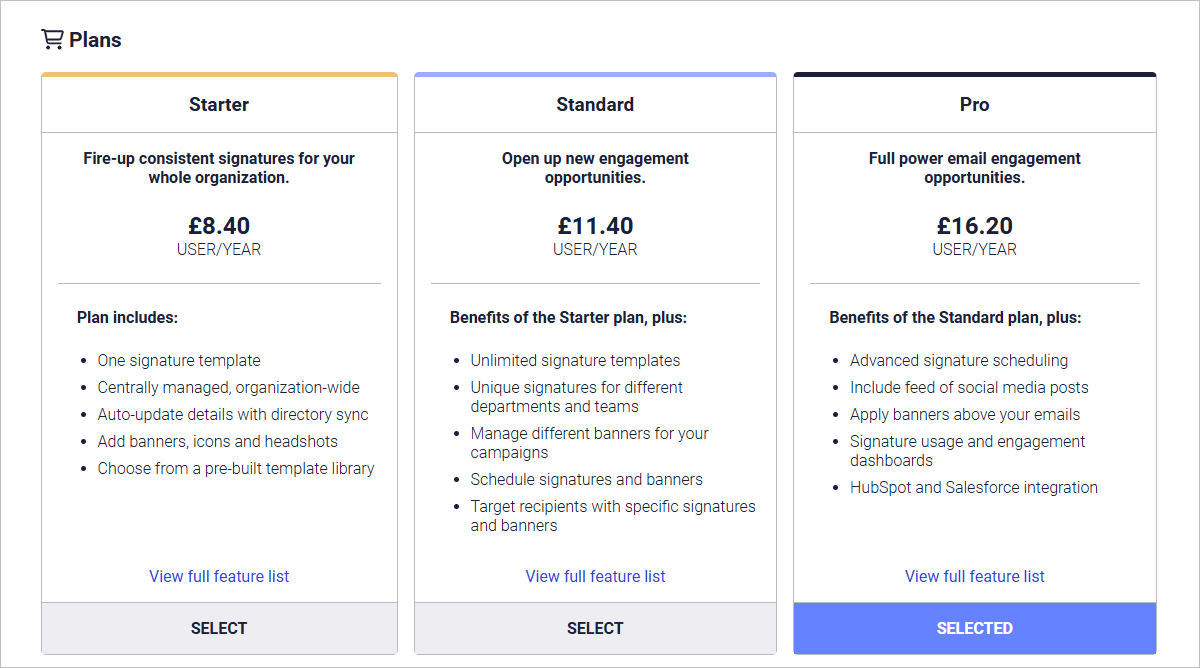
The Plans display a brief summary of each plan type. Select View full feature list for a complete breakdown of available features on each plan.
NOTE: Trial subscriptions are subscribed to the Pro plan. If you wish to select a different plan when purchasing, communicate this change with your Exclaimer account manager, and see the What to expect when purchasing a Standard or Starter plan section of this article. - In the Subscription Details section, select your subscription billing period: Monthly or Annually.
The Subscription Details section.
-
Enter the number of users in the entry field under the plan type. The total price per billing period is displayed in the Total per... bar and next to the entry field.
NOTE: You must have a minimum of 10 users. - In the Billing information section, enter the billing details. Select the Use These Details for Invoice checkbox to save your billing details for invoicing.
-
Select your payment method.
NOTE: When paying via credit or debit, you must first set up your payment details. For more information, see how to add credit or debit card details and how to add Direct Debit details. For Direct Debit, check if the Direct Debit option is available in your country.
If the total number of users is 499 or below, select either Direct Debit or Credit card.
If the total number of users is 500 or more, select either Direct Debit, Credit card or Invoice. - Select Confirm and Complete Purchase.
When the purchase is complete, you will receive a confirmation email including your plan details and our terms and conditions.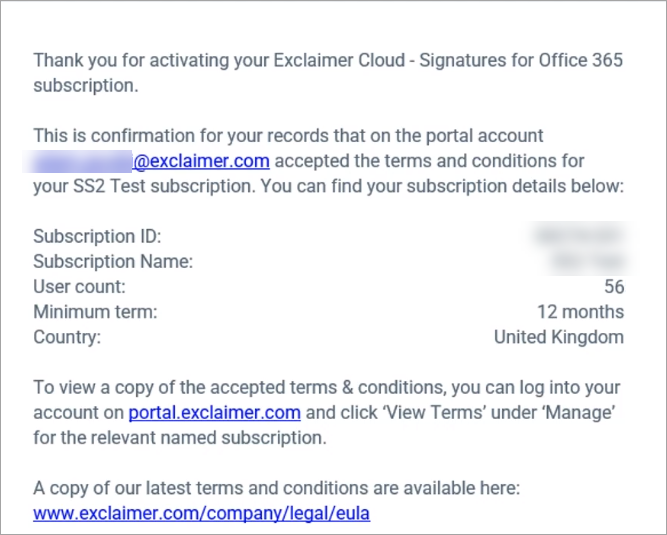
A typical confirmation message.
-
Your subscription will now become available in the Signatures list in the Overview tab. Select Launch to open your subscription, or select Manage to manage your subscription details, including adding another login, viewing subscription details such as number of users or whether it is an Active subscription or in Trial, and access to your Subscription ID).
NOTE: If you are purchasing a trial that has been expired for an extended period of time, there may be a delay before email processing begins to work again.
During an Exclaimer trial, you experience all the features of the Pro plan. If you decide to switch to a Standard or Starter plan when purchasing, then features exclusive to Pro will no longer be available. For a comparison of features and capabilities on different plans, see What is included in your plan.
When you purchase Exclaimer without a trial subscription, you can choose from Starter, Standard, or Pro directly.