
Description
Use the Enable HRIS access feature to connect supported HR systems and sync employee data into Exclaimer.
NOTE: This feature is only available in Pro Plan. For more information on pricing plans, see Exclaimer Pricing Plans.
How to access it
To access the Enable HRIS access option:
-
From the header bar, select the cogwheel icon, then select Sender Management.
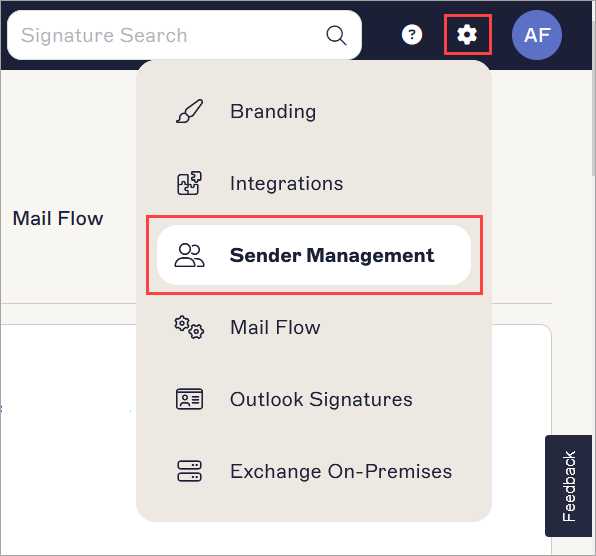
The example image is for a Microsoft 365 subscription and shows the Settings menu.
- Navigate to the Enable HRIS access section.
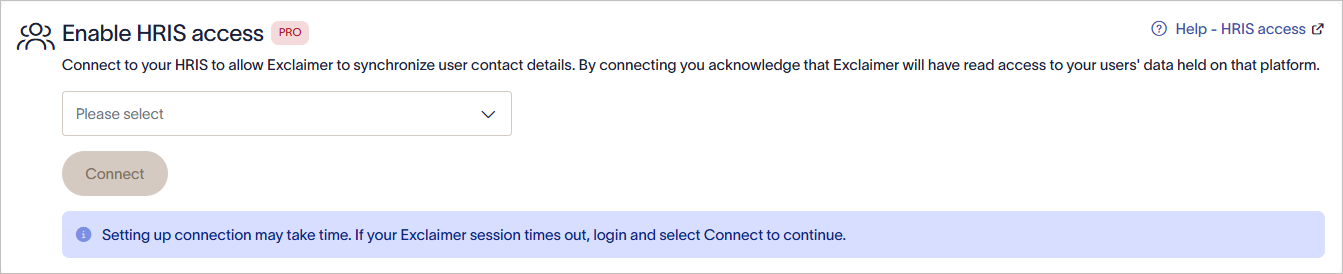
The Enable HRIS access section.
Configure HRIS integrations
In the Enable HRIS access section, connect a supported HR system to automatically sync user data. Select and configure one of the following:
- Workday: Connect your Workday account to synchronize employee data into Exclaimer.
- UKG Ready: Connect your UKG Ready account to synchronize employee data into Exclaimer.
- Workday RaaS (Reports as a Service): Connect your Workday RaaS report to synchronize employee data into Exclaimer.
- BambooHR: Connect your BambooHR account to synchronize employee data into Exclaimer.
- SAP Success Factors: Connect your SAP SuccessFactors account to synchronize employee data into Exclaimer.
-
ADP Workforce Now: Connect your ADP Workforce Now account to synchronize employee data into Exclaimer.