
Scenario
The emails sent to Exclaimer are not being delivered (or delivery is delayed), and the Microsoft 365 message trace shows the following error:
ERROR: Reason: [{LED=422 4.4.1 Unable to identify upstream MTA for 'domain'}
Reason
You received this error message because the Exclaimer proxy server is unable to identify the server to which the message needs to pass.
Typically, this scenario occurs when the Mail Routing options in Exclaimer are configured to return messages to the Sender Domain. The configuration implies that Exclaimer performs a lookup for each processed email, passing the processed email back to the server(s) specified within the sending domain name’s MX records.
Resolution
We recommend! You change the Mail Routing options within your Exclaimer subscription to deliver the email directly back to Microsoft 365 (instead of the sender domain’s MX records).
Follow these steps to resolve the issue:
- Log into the Exclaimer portal (portal.exclaimer.com) and Launch your subscription.
- From the header bar, select the cogwheel icon to open the Settings menu.
- Select Mail Flow.
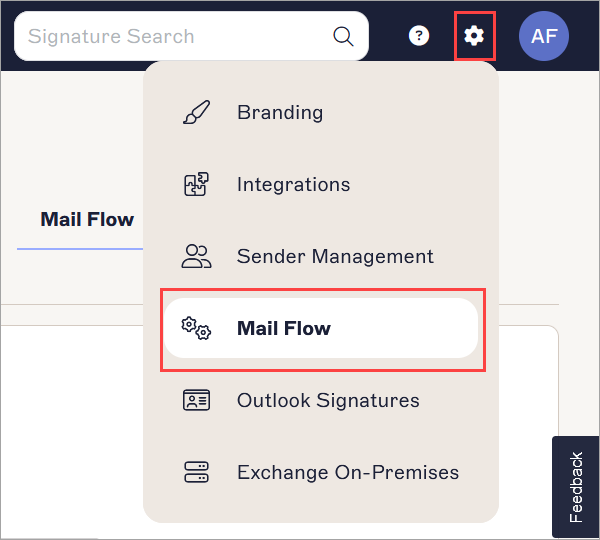
Mail Flow is found in the Settings menu.
- Locate Mail Routing Domain. You may have to scroll.
- In Domain Name, enter the .omnicrosoft.com domain name - this can be located in the Domain list in the Microsoft 365 Admin Center. This setting is important, and an incorrect domain can result in mail flow issues.
Example: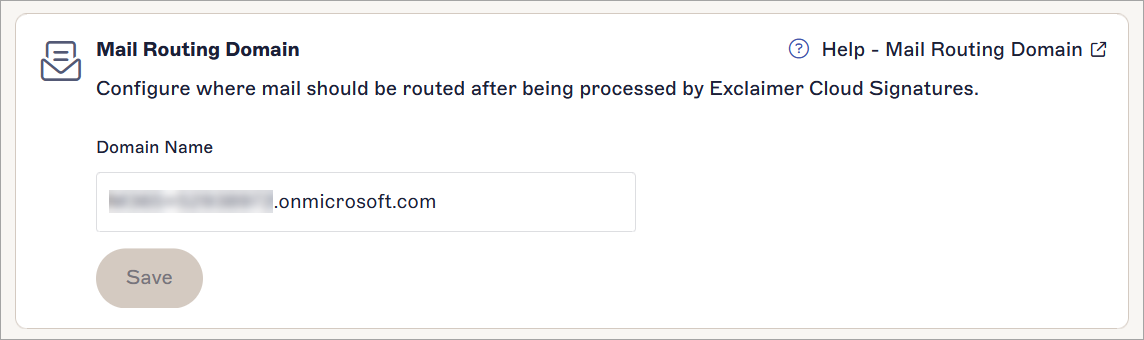
The Mail Routing Domain section.
- In the unsaved changes banner, select Save.
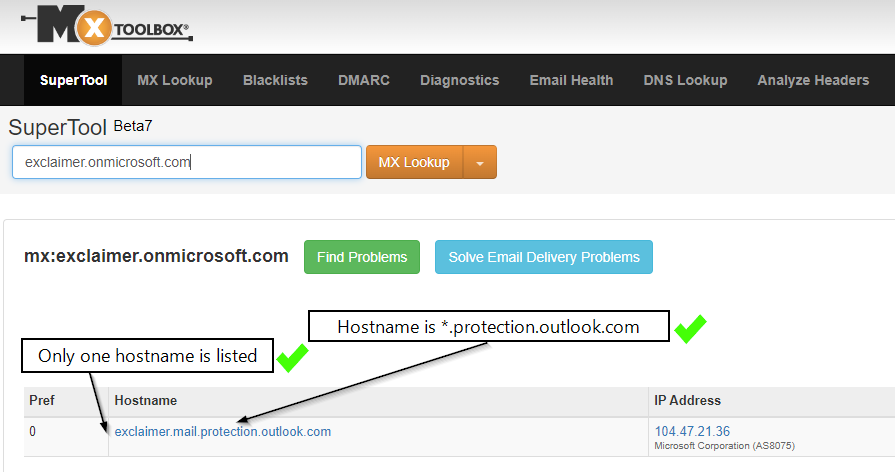
NOTES: The MX record for the Domain name (in the Mail Routing settings) should specify a single Exchange Online Server for your Microsoft 365 tenancy.
- To check the MX record for your own Domain name, use a DNS lookup tool, such as MXToolbox.
Example showing Exclaimer's domain:
- To check the MX record for your own Domain name, use a DNS lookup tool, such as MXToolbox.
Example showing Exclaimer's domain: