
Scenario
You want to query Entra ID (formerly Azure AD) for user photo data which may be synced with Exclaimer.
Resolution
Graph explorer can return available user photo data on a per-user basis. For a full list of user data, see How to use Graph Explorer to query Entra ID for specific user data. For more information on querying for photos, see Microsoft Graph's resources on photo data.
Pre-requisites: To complete this solution, you will need Microsoft 365 Global Administrator credentials.
- Log in to Microsoft Graph Explorer (https://developer.microsoft.com/en-us/graph/graph-explorer) using Global Administrator credentials.
- If prompted, accept the permissions request.
- Use the drop-down menu to change the API from V1 to Beta.

Select beta from the drop-down.
-
In the text entry field, enter the following:
https://graph.microsoft.com/beta/users/ - After the /, enter the UPN of the user you are querying for.
-
After the UPN, enter:
/photo/$value -
Select Run query.
The results list displays the response code 200 OK and the binary data of the requested photo. If no photo exists, the result is 404 not found.
Troubleshooting
If you receive an error stating that you have insufficient privileges, complete the following:
- Navigate to the Modify permissions (Preview) tab.
- Locate the Directory.ReadWrite.All permission and select Consent.
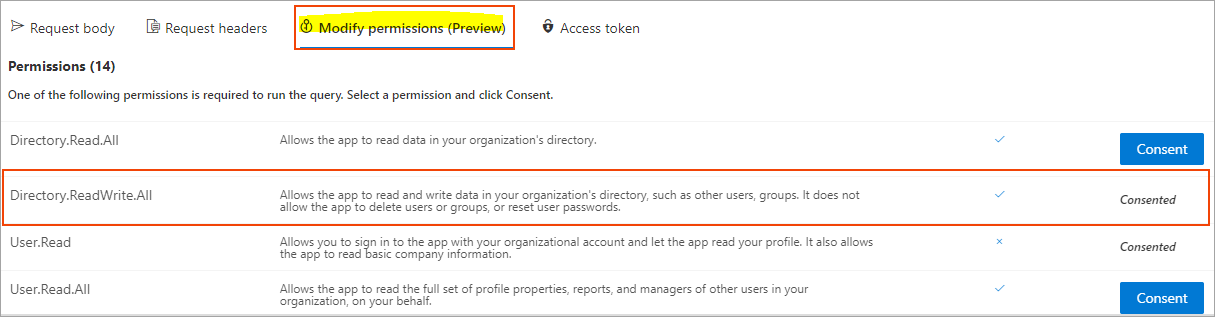
The permission displays Consented once it has been consented to.
Next steps: If you need to send the output to Exclaimer Support, copy the results text to a text file and attach it to your Support ticket.